BundleContext context = FrameworkUtil.getBundle(MyService.class).getBundleContext();
ServiceReference reference = context.getServiceReference(MyService.class.getName());
MyService myService = (MyService) context.getService(reference);
Donnerstag, 8. August 2013

Freitag, 26. Juli 2013
Dienstag, 18. Juni 2013
Sonntag, 9. Juni 2013
Trainingsweltmeister - online training planning
I've started a new project with @SchualiSan called trainingsweltmeister.
The web application will be able able to calucalte a dynamically training plan, depeding on your behaviour and feeling.
Currently, we only hosted the coming soon page.
More update will follow!
Montag, 3. Juni 2013
Scheduled Service in CQ5
Cron or Quartz like behaviour in CQ5 comes out of the box. See more examples. I have seen the annotation as comments, which I think is a bad style.
import org.apache.felix.scr.annotations.Component;
import org.apache.felix.scr.annotations.Property;
import org.apache.felix.scr.annotations.Service;
import org.slf4j.Logger;
import org.slf4j.LoggerFactory;
@Component
@Service
@Property(name="scheduler.expression", value = "0 * * * * ?")
public class ScheduledJob implements Runnable {
private static final Logger LOGGER = LoggerFactory.getLogger(ScheduledJob.class);
public void run() {
// your code goes here ...
}
}
Montag, 6. Mai 2013
Find influential online texts
I resumed activities of on old private project, that targets the issue of finding relevant information in the internet, called resonance doctrine. It uses feeds, mainly from blogs, and calculates a quality score.
Montag, 22. April 2013
Force Opera to display JSONs in browser
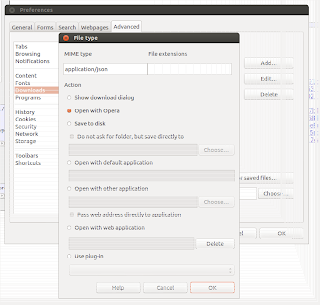
Maybe you suffer from the problem, that Opera always wants to download a JSON file (mime: application/json) instead of displaying it using fancy extensions like JSONviewer. This can be solved by adding a rule for mime type application/json, as seen in the screenshot. Click Settings > Preferences > Advanced > Downloads > Add.

Samstag, 20. April 2013
YouTube videos to mp3 converter script
I am using a tiny shell script that converts a youtube video to mp3. It takes as input the youtube url and generates the mp3 in ~/youtube-dl. It requires youtube-dl, so probably it is limited to *NIX boxes.
$ sudo apt-get install youtube-dl
Create a file youtube-conv.sh with the following code
#/bin/sh
name=$(youtube-dl --get-title ${1}|sed 's/ /_/g')
echo title ${name}
id=$(echo ${1} | sed 's/=/ /g' | awk '{print $2}')
echo download to ${id}
youtube-dl ${1} -o ${id}
# > /dev/null
echo convert to ~/youtube-dl/${name}.mp3
convert=$(ffmpeg -i ${id} -f mp3 ~/youtube-dl/${name}.mp3)
echo ${name}.mp3 created
echo remove ${id}
rm ${id}
Invoke the script with the youtube url as argument, e.g.
./youtube-conv.sh http://www.youtube.com/watch?v=7cF2ZSNrEIw
Note: there are issues, if the video name contains non ASCII characters
Mittwoch, 17. April 2013
CQ5 replace Tab in ContentFinder with custom implementation
Adobe already explained how to add a custom tab to Content Finder. In order to replace an existing tab with your custom js file, e.g. movie tab, you simply have to use the same "id" value. For the movie tab, it is cfTab-Movies
{
"tabTip": CQ.I18n.getMessage("Movies"),
"id": "cfTab-Movies",
"xtype": "contentfindertab",
"iconCls": "cq-cft-tab-icon movies",
(..)
}
Montag, 15. April 2013
Parent-aware unidirectional @OneToMany relationship in Hibernate/JPA
In a classical unidirectional one-to-many relation, the referred entity (Call) is not aware of its parent (Bill).
public class Bill {
(...)
@OneToMany( fetch = FetchType.LAZY, cascade = CascadeType.ALL)
@JoinColumn(name = "billId")
private Set calls;
(...)
}
Though, there may be some cases, where it is reasonable to make the information of the relation also available in the child entity (again, Call), e.g. if you want to retrieve all Calls of a specific Bill.
An easy way to achieve that, is to explicetily add a @JoinColumn to the child entity. This column is completely managed by JPA/Hibernate, hence not modifieable.
public class Call {
(...)
@Column( insertable = false, updatable = false )
private Long billId;
(...)
}
This solution expects, that Id column of Bill is of type long.
Use orphanRemoval=true, to force removal of not associated childs.
Samstag, 13. April 2013
Video lectures about machine learning
Some really good videos of an indian university, in the field of machine learning
Freitag, 5. April 2013
mutlitail - scrolback and pause features
The two probably most important features in multitail (via pantz.org).
Pause
To pause all the logs press the "p" key.
Scroll back
To use the log windows scroll back feature press the "b" key and select the log you want to scroll back through.Maybe you will need those commandline options
-mb x Set scrollback buffer size (in bytes, use xKB/MB/GB).
-M nlines Set the buffersize on ALL following files.
glogg - GUI-based log highlighting
Days ago, I mentioned a console based highlight tool multitail, today I want to suggest the GUI-based tool glogg. Glogg could be an *NIX alternative to the Windows flagship BareTail.

$ sudo apt-get install glogg

Montag, 1. April 2013
Apache2 file permissions
Directories
find /var/www -type d -exec chmod 0775 {} +
Files
find /var/www -type f -exec chmod 0664 {} +
Freitag, 29. März 2013
Terminator - multiple terminals in one window
Terminator is a handsome python implementation of a terminal emulator, that supports tiling, which is awesome. This means, several terminals are arranged in one window

Dienstag, 26. März 2013
Multitail: Log output highlighting in terminal
Multitail is a command line tool primarily used to merge several log files.
It is also capable of highlighting the output from one or more log files. In Ubuntu, you simply create or extend your multitail configuration in your home.
vi ~/.multitailrc
and define there your custom color scheme named yourcolorscheme
colorscheme:yourcolorscheme
cs_re:red,,bold:.*ERROR.*
cs_re:green:INFO
When invoking multitail command, provide the designated color scheme (-cS) you want to use.
multitail -cS yourcolorscheme -f logs/server.log
Thanks to Gilles for the input.
Freitag, 8. Februar 2013
Howto disable upload of CQ5 SmartImage
According to the SmartImage API docs, there is a option to disable the upload of this component.
allowUpload="false"
Unfortunately, it is still possible. I tried to solve it, by preventing the click event. Nothing.
I solved it using a CSS workaround, that hides the file upload field. Don't forget to specify the id in both snippets.
<image
jcr:primaryType="cq:Widget"
allowUpload="false"
ddGroups="[media]"
height="300"
mimeTypes="*.jpg;*.jpeg;*.gif;*.png"
mimeTypesDescription="Images"
name="./image"
hideLabel="true"
id="some-unique-id"
xtype="smartimage">
// ...
</image>
Add this to your css to hide the upload field
/* Hide upload field */
#some-unique-id .x-form-item {
display: none!important;
}
MySQL Change root Password
Some website, I've seen, recommend
$ mysqladmin -u root -p'oldpassword' password newpass
This is bad, cause all your commands go in plain text straight into your history. Actually you should use
$ mysqladmin -u root -p password
You will be prompted for the old and a new password.
Mittwoch, 6. Februar 2013
Resize an image resource in CQ5 using Java
I already posted the question on stackoverflow, but since I am not allowed yet to post a solution, I'll post it here.
I found a quite low level approach, to resizes a image identified by jcrPathToImage to int targetWidth and int targetHeight.
Resize Image
Resource resource = getResourceResolver().getResource(jcrPathToImage);
Asset asset = resource.adaptTo(Asset.class);
Layer layer = new Layer(asset.getOriginal().getStream())
layer.resize(targetWidth, targetHeight);
Create new rendition in JCR
Extract mime type of the original imageImage image = new Image(resource);
String mimeType = image.getMimeType();
Store the resized Image using its asset representation.
ByteArrayOutputStream bout = null;
ByteArrayInputStream bin = null;
try {
bout = new ByteArrayOutputStream(2048);
layer.write(mimeType, 1, bout);
bin = new ByteArrayInputStream(bout.toByteArray());
asset.addRendition(resizedImgName, bin, mimeType);
} finally {
// close streams ...
}
This may be useful to generate thumbnails.
CQ5 Dialog Validation
By registering a listener to the beforesubmit event, you can validate a dialog.
...
xtype="dialog">
<listeners
jcr:primaryType="nt:unstructured"
beforesubmit="function(dialog){
// your validation code
return isValid;
}"
/>
<items jcr:primaryType="cq:TabPanel">
...
Serverside Validation
After defining a custom validating servlet, you can put the following code snippet in the beforesubmit area. It is important to call the servlet using async=false, to ensure everything is handled by the same thread.CQ.Ext.Ajax.request({
method: 'POST',
url: '/content.myvalidationservlet.json',
async: false,
success: function(response){
// do something
},
params: { ... }
});
Abonnieren
Posts (Atom)